
Please see instructions on how to subscribe below.
1.To subscribe go to our website /#pricing
2. Select the subscription period you would like to purchase 1, 3, 6, or 12 months and then click the "Get Started Now" button.
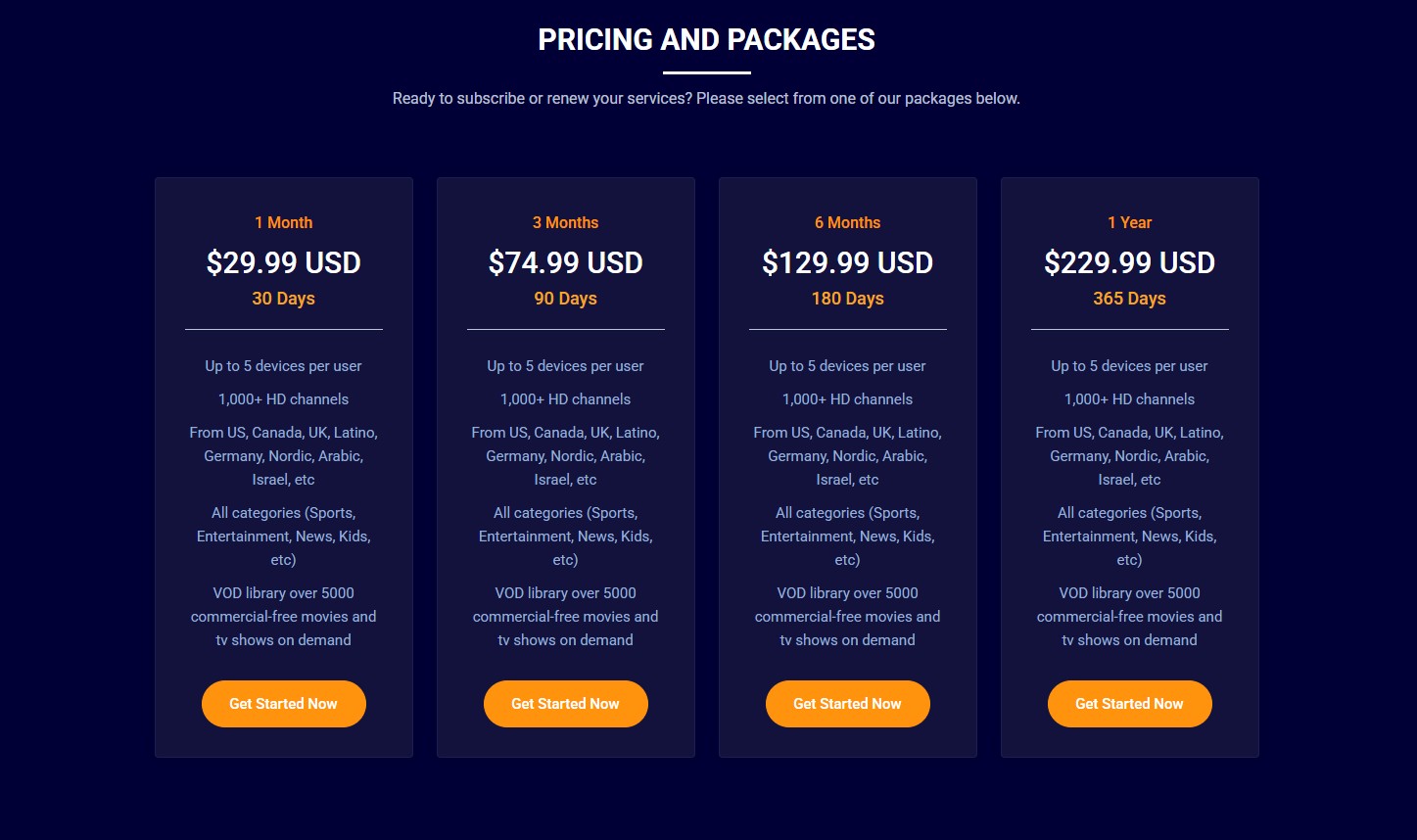
3.You will be taken to our CHECKOUT page.
4.Fill out the billing details form using a valid Name and Email address.
5.Choose your preferred payment method and click the CHECKOUT button.
Option 1 - Credit Card
- If you've selected the credit card option, you will be redirected to SunCash where you will be asked to fill out all required fields.
- Enter your details to confirm your payment. Once the payment is made your account gets activated in a few short minutes.
Option 2 - PayPal
- If you've chosen to go with the PayPal option instead, you will be redirected to PayPal where you will have be asked to log into your account.
- Enter your details to confirm your payment. Once you have paid, your account gets activated in a few seconds.
*NOTE: If after 1 hour you not receive login credentials, please email us at billing@islandstreams.tv for further assistance.